


Technical SEO Checklist 2027: How to Fix Indexing, Core Web Vitals, JavaScript, Canonical Tags & Schema

Key takeaways
- Classify every URL by business value and intended index status before fixing anything; not every excluded URL is a problem.
- Canonical tags are signals, not commands – Google may pick a different canonical.
- The three Core Web Vitals are LCP (good at 2.5 s or less), INP (200 ms or less) and CLS (0.1 or less), measured on real-user data.
- Structured data must match visible content. FAQ rich results no longer appear in Google (since 7 May 2026).
Introduction
Technical SEO makes sure search engines – and the AI features built on them – can discover, render, understand and index the pages a business wants customers to find. A beautiful website can still underperform when product URLs are accidentally noindexed, important links are hidden behind JavaScript, or several versions of the same page send conflicting canonical signals.
This guide gives you a repeatable eight-step audit workflow for 2027, with tools, code examples and scenarios suitable for WordPress, e-commerce and B2B websites.
Why technical SEO matters for AI search too
Google states that to appear in AI Overviews or AI Mode, a page must be indexed and eligible to be shown with a snippet. There are no additional technical requirements – so the basics in this checklist are also your AI-search foundation.
Step 1: Audit crawling and indexability
Start with a full crawl and compare it with your XML sitemap and the Search Console Page indexing report. Classify URLs by business value and intended index status before changing anything. A thank-you page, filtered URL or duplicate may correctly stay out of the index.
| Check | Good practice | Tool |
|---|---|---|
| robots.txt | Do not block content, CSS or JS needed to render key pages. | Browser, GSC robots.txt report |
| XML sitemap | Include only preferred, canonical, indexable URLs that return 200. | Screaming Frog, GSC Sitemaps |
| noindex | Use intentionally; check templates and staging leftovers. | Crawler, URL Inspection |
| HTTP status | Important pages return 200; permanent moves use 301/308. | Crawler |
| Internal links | Important pages have crawlable HTML <a href> links. | Crawler, rendered DOM |
Example: robots.txt
# robots.txt - a safe starting point for a WordPress site
User-agent: *
Disallow: /wp-admin/
Allow: /wp-admin/admin-ajax.php
Disallow: /*?s= # internal search results
Sitemap: https://www.example.com/sitemap_index.xml
Remember that robots.txt controls crawling, not indexing. To keep a page out of results, allow it to be crawled and use a noindex directive:
Example: page-level noindex
<meta name="robots" content="noindex, follow">Example: the leftover noindex
A B2B company launches 20 new product pages. The template still carries a noindex tag from the staging site, so the URLs sit in the sitemap but can never be indexed. Fix: remove the directive, check a few live URLs with URL Inspection, then request indexing. Indexing is neither guaranteed nor instant.
Illustrative scenario.
Step 2: Fix broken links and redirects
Export internal 4xx URLs and redirect chains. Update internal links to point directly to the final destination. Use 301 or 308 redirects for permanent moves, and avoid redirecting unrelated removed pages to the home page (Google may treat these as soft 404s).
| Issue | Example | Recommended action |
|---|---|---|
| Broken internal link | /fibc-bag-old returns 404 | Update the link to the correct live page |
| Redirect chain | A -> B -> C | Point internal links to C; redirect A straight to C |
| Soft 404 | Empty product page returns 200 | Restore useful content or return 404/410 |
| Orphan page | Important page has no internal links | Add navigation and contextual links |
Step 3: Review canonical tags and duplicates
Canonical tags are signals rather than commands. Use self-referencing canonicals on preferred indexable pages, and keep redirects, sitemaps, internal links and hreflang (if used) consistent with them. Do not canonicalize distinct product variants that meet different user needs.
Example: self-referencing canonical
<link rel="canonical" href="https://www.example.com/bulk-bags/">Example: three URLs, one page
/bulk-bags/, /bulk-bags/?ref=campaign and /bulk-bags/index.html show identical content. Choose /bulk-bags/ as the preferred URL, link to it consistently and set the canonical. Then check the Google-selected canonical in URL Inspection – it can differ from the one you declared.
Serving India and international markets? If you run separate pages per region, add reciprocal hreflang tags, for example hreflang=”en-in” for India and hreflang=”en-us” for the USA, plus an x-default version.
Step 4: Improve Core Web Vitals and mobile performance
Core Web Vitals are assessed on real-user (field) data at the 75th percentile of page loads. The current metrics are Largest Contentful Paint (LCP), Interaction to Next Paint (INP, which replaced First Input Delay in March 2024) and Cumulative Layout Shift (CLS).
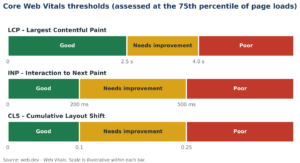
Figure 2: Good, needs-improvement and poor thresholds for each Core Web Vital.
| Metric | Good | Needs improvement | Poor | Typical fixes |
|---|---|---|---|---|
| LCP | <= 2.5 s | 2.5 – 4.0 s | > 4.0 s | Compress and preload the hero image, faster server response (TTFB), remove render-blocking CSS/JS |
| INP | <= 200 ms | 200 – 500 ms | > 500 ms | Break up long JavaScript tasks, defer third-party scripts, lighten event handlers |
| CLS | <= 0.1 | 0.1 – 0.25 | > 0.25 | Set width/height on images and embeds, reserve space for banners, use font-display |
Example: the 5 MB hero video
A manufacturing homepage autoplays a 5 MB hero video and its mobile LCP sits in the “poor” band. Replace the above-the-fold video with a compressed WebP poster image (under 150 KB), load the video only on click, and defer non-essential scripts. Then compare 28 days of field data before and after, rather than promising a traffic uplift.
A perfect lab score in PageSpeed Insights does not guarantee rankings. Page experience is one of many signals, and content relevance still comes first.
Step 5: Test JavaScript rendering
Google can render most JavaScript websites, but important content and links should be available reliably. Compare the raw HTML with the rendered HTML and check that product descriptions, specifications, headings and links appear after rendering. Do not require a click or scroll to reveal essential content.
| Test | Potential problem | Remedy |
|---|---|---|
| View source vs rendered HTML | Critical text missing until scripts run | Server-side rendering or pre-rendering |
| Internal links | Click handlers without crawlable href values | Use standard <a href> links |
| Resource loading | Blocked JS/CSS files | Allow required resources; fix console errors |
| Hydration | Content disappears or changes after load | Fix client/server rendering mismatch |
Quick test
In URL Inspection, run Test live URL and open View tested page > HTML. Search for a sentence from your product description. If it is missing, Google is not seeing it either.
Step 6: Validate structured data
Structured data must describe visible, accurate page content and follow Google’s feature policies. Choose the types that apply instead of adding every schema available. Eligibility for a rich result is never assured.
| Page type | Potential markup | Validation |
|---|---|---|
| Home / About | Organization (name, logo, contact, sameAs profiles) | Rich Results Test + Schema Markup Validator |
| Any page with breadcrumbs | BreadcrumbList | Rich Results Test |
| Product detail page | Product / Offer – only when price and availability are real and visible | Rich Results Test |
| Blog article | Article / BlogPosting with a named Person author | Rich Results Test |
| Local office page | LocalBusiness (address, hours, phone) | Rich Results Test |
2026 update: FAQ rich results are gone
Google stopped showing FAQ rich results in Search on 7 May 2026 and removed FAQ support from the Rich Results Test and Search Console reports. FAQPage markup remains valid and harmless, but do not sell it as a visibility tactic.
Example: invented markup
A manufacturer marks every service page as a Product with made-up prices and five-star reviews. This breaks Google’s structured data policies and can lead to a manual action. Replace it with Organization and BreadcrumbList markup that matches what users see, and never fabricate ratings, offers or credentials.
Step 7: Check mobile UX, HTTPS and site architecture
- Confirm navigation, forms and important content work on small screens (Google uses mobile-first indexing).
- Serve every page over HTTPS and fix mixed-content warnings.
- Use short, descriptive URLs and logical category-to-detail linking (Home > Products > FIBC Bags > U-Panel).
- Avoid intrusive pop-ups that block essential content, especially on mobile.
- Check language and regional signals (hreflang) when operating across countries.
Step 8: Prioritize technical fixes by business impact
| Priority | Illustrative issue | Why it matters | Owner |
|---|---|---|---|
| Critical | Service template accidentally noindexed | Key conversion pages cannot be indexed | SEO + developer |
| High | Broken internal links to product categories | Reduced discovery and broken user journeys | SEO + developer |
| Medium | Poor LCP on top landing pages | User experience and possible search impact | Developer |
| Low | Duplicate meta descriptions on minor utility URLs | Less urgent than indexing or conversion issues | SEO |
Example audit summary: 100-page B2B website
| Finding | Count | Next action | Validation |
|---|---|---|---|
| Accidentally noindexed service pages | 6 | Correct template directive | URL Inspection |
| Broken internal links | 18 | Update links / restore valid destinations | Recrawl |
| Slow mobile templates | 3 | Optimize media and scripts | CrUX / PageSpeed Insights |
| Conflicting canonicals | 9 | Align canonical and linking signals | GSC + crawler |
| Invalid structured data items | 7 | Correct or remove unsupported properties | Rich Results Test |
These figures are hypothetical and show the reporting format only. Real counts must come from your own crawl and Search Console export.
Recommended tools and when to use them
| Tool | Use it for | Frequency |
|---|---|---|
| Google Search Console | Page indexing, URL Inspection, Core Web Vitals report | Weekly and after releases |
| Screaming Frog SEO Spider | Full crawl, redirects, canonicals, internal links | Monthly and after releases |
| PageSpeed Insights | Page-level field and lab performance | After performance changes |
| Chrome DevTools | Rendering, network and JavaScript diagnostics | As needed |
| Rich Results Test | Google-supported rich result checks | After schema changes |
| Schema Markup Validator | General schema.org syntax review | After schema changes |
| Bing Webmaster Tools | Bing indexing and crawl issues | Monthly |
| GA4 | Conversions and landing-page outcomes | Monthly |
Technical SEO implementation SOP
- Create a crawl baseline and export URL, status, indexability, canonical and inlink reports.
- Compare Search Console Page indexing categories with your intended indexable URL list.
- Group issues by template and business impact, not raw issue count.
- Assign each fix an owner, deadline and acceptance criteria.
- Deploy on staging, test representative URLs, then publish.
- Recrawl affected templates and monitor Search Console and field data over the following weeks.
- Document every change and annotate monthly performance reports.
Frequently Asked Questions
A sitemap helps discovery but does not guarantee indexing. Check for noindex, canonicalization to another URL, duplicate content, blocked crawling and whether the page offers unique value.
No. Accurate, supported markup can make pages eligible for certain search features, subject to Google’s policies. It is not a ranking boost and is not required for AI Overviews.
No. A genuinely removed page can return 404 or 410. Redirect only when a relevant replacement exists.
Field data in CrUX and Search Console uses a rolling 28-day window, so allow about four weeks after a fix before judging results. Never draw conclusions from a single lab test.
Conclusion
Technical SEO is an ongoing quality-control process. In 2027, prioritize indexable pages, reliable rendering, consistent canonical signals, strong mobile performance and accurate structured data. Connect every fix to page value, user experience and measurable enquiries – not just an audit tool’s health score.
Need a prioritized technical SEO roadmap?
SEOWebPlanet Solutions can audit your website, identify the issues blocking your key pages and help your developers validate every fix.
About SEOWebPlanet Solutions
SEOWebPlanet Solutions is a Vadodara, Gujarat-based digital marketing agency with 13+ years of experience serving B2B, B2C and D2C brands across India and international markets. Services include SEO, AEO and GEO, website design and development, PPC and paid social, social media marketing, email and WhatsApp marketing, lead generation and corporate branding.
Editorial fact-checking references (checked November 2026)
- Google Search Essentials – developers.google.com/search/docs/essentials
- Google: AI features and your website – developers.google.com/search/docs/appearance/ai-features
- Google: Optimizing for generative AI features (updated July 2026) – developers.google.com/search/docs/fundamentals/ai-optimization-guide
- Google: Search Generative AI performance reports (June 2026) – developers.google.com/search/blog/2026/06/gen-ai-performance-reports
- Google canonicalization – developers.google.com/search/docs/crawling-indexing/consolidate-duplicate-urls
- Google JavaScript SEO basics – developers.google.com/search/docs/crawling-indexing/javascript/javascript-seo-basics
- Google structured data intro and FAQPage notice – developers.google.com/search/docs/appearance/structured-data
- Web Vitals – web.dev/articles/vitals
- Pew Research Center, AI summaries and clicks (July 2025) – pewresearch.org